AV Music Morpher products
Frequently asked questions




$99.95 » Learn more
Voice Changer Software DIAMOND 9.5
$200 $100
» Learn more

$199.95 $29.99
» Learn more
Find answers to your questions about installing Music Morpher or MP3 Player Morpher onto your computer.
TIPS:
- Go to
//babelfish.altavista.com/tr to translate this content to other languages.
- Music Morpher is now available in 3 editions. Click
here to view their features and pricing comparison information.
PART 1: GENERAL QUESTIONS - Click here
PART 2: QUESTIONS ABOUT EDITION DIFFERENCES - Click here
PART 3: QUESTIONS ABOUT INSTALLATION
3-3. How can I install the Plus Version?
3-4. ASPI is not available in my computer. How can I get it?
3-5. Questions about the license of the product
PART 4: QUESTIONS ABOUT PRODUCT FUNCTIONING - Click here
Still cannot find the solution for your problem? Contact our Support team.
PART 3: QUESTIONS ABOUT INSTALLATION
|
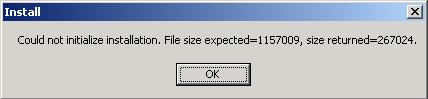
3-1. I can’t activate the installation due to the error “Could not initialize installation. File size expected = 1416160, size returned = 229376." Top Because your download is interrupted due to a network problem, the file size is not enough for installation to be activated. So please try again to download the setup file. During the download, remember to close all other running applications (even instant messengers) to optimize the process and avoid download interruption. 3-2. I want to uninstall the program, but an error comes up saying "Could not open INSTALL.LOG file. What should I do? Top This error is a rare case. If it does happen, please try doing as follows to uninstall the
program: 3-3. How can I install the Plus Version? Top First download the setup file from the link mentioned in our instruction mail. Second, run it to install the Plus Version onto your computer. When the registration form comes up, enter exactly your given key (including Email, First + Last name, Serial Number) to the form. Please note that any differences in the lower and upper cases, as well as any spaces (especially spaces at either ends of the words) can cause failure to installation. |
|
3-4. ASPI is not available in my computer. How can I get it? Top
Our music processing programs requires Adaptec ASPI driver to perform on your system. Normally, when you install the program, ASPI is automatically added to your computer. However, if you still get any error or message requesting ASPI driver, depending on your version of Windows, click on the following link accordingly to download a FREE driver of ASPI. For Windows 95: click here. For Windows 98/2000/NT/Me/XP: click here.
3-5. Questions about the license of the product Top
These matters are covered in our FAQ page about our policies. Click here to visit the page.


|
Copyright © 2001 - 2024 AVSOFT CORP. All Rights Reserved
|

 English